Is It Time for a Salesforce Health Check?

Is It Time for a Salesforce Health Check?

Salesforce Check-Up

With constant growth and changes to the Salesforce ecosystem and rapidly evolving business needs, how can you be certain about the health of your system? Are you confident that you are utilizing the latest and greatest Salesforce capabilities properly?

With your investment in Salesforce, as with any investment, it’s essential to regularly evaluate how your investment is paying off. So let’s discuss a few reasons why it may be time to evaluate your Salesforce ecosystem, along with next steps to consider.

Why Salesforce Health Matters

A healthy Salesforce org does more than store data; it supports how teams work every day.

When Salesforce is healthy:

  • Teams trust reports and dashboards

  • Processes feel intuitive, not forced

  • Adoption stays high

  • Leaders can make decisions with confidence

When it isn’t, symptoms tend to show up quietly at first, then compound over time.

Signs Your Salesforce Org May Need a Check-Up

Many organizations don’t realize Salesforce health has declined until problems begin to impact performance. Common warning signs include:

  • Reports that don’t match day-to-day reality

  • Manual workarounds outside of Salesforce

  • Inconsistent or incomplete data

  • Low or uneven user adoption

  • Forecasts that require constant explanation

  • Admin or ops teams spending more time fixing issues than improving the system

These symptoms usually point to foundational gaps, not a lack of features.

Questions to Consider

With a healthy Salesforce ecosystem, your team should be able to answer these questions with confidence. Take a moment to think these through and consider whether it may be time to assess your system.

  • How accurate and up-to-date is our data?
  • Do teams have a complete, reliable view of customer and operational data?
  • How are our systems integrated? Are those integrations automated and reliable?
  • Are we utilizing proper metrics?
  • Have we encountered new pain points since we last optimized our system? 
  • Can our system be better optimized to address new pain points?
  • Are our reports and dashboards reflective of our performance and easy to maintain?
  • Is our reporting structure appropriate for today’s business and tomorrow’s growth?
  • Is Salesforce configured to support our unique business processes?
  • Does our system meet the latest company security standards?

If your confidence level is low or unclear after considering these questions, a deeper assessment may be an appropriate next step.

Salesforce Assessment Services

Having a third-party partner with an outside perspective come in and assist in gathering this information can be extremely helpful. 

At WhiteRock, we provide detailed assessment services to understand how your Salesforce platform is utilized and leveraged to support your business. We review findings in a working session with your team to confirm findings and discuss options.

Following the assessment, your team receives a clear report outlining:

  • Key findings

  • Recommended improvements

  • A prioritized roadmap for implementation (your CRM journey map)

From there, you’re free to use the assessment internally or engage WhiteRock to help implement changes with full accountability and progress reporting throughout the journey.

Benefits of Working With A Salesforce Partner

Partnering with a team of Salesforce experts that you can trust and count on allows you to feel confident that your systems are effectively supporting your business needs.

At WhiteRock, we take the time to understand how your organization operates and help design solutions that support real workflows. As your business evolves, we help ensure Salesforce evolves with it and stays useful, reliable, and easy to work with.

So, Are You Confident in the Health of Your Salesforce Ecosystem?

In our view, this is a question worth asking regularly.

Continuous improvement helps ensure Salesforce remains a system your teams trust to support informed decisions, efficient processes, and long-term growth.

If you’re unsure where to begin, we’re happy to talk it through or provide an assessment tailored to your organization. Reach out to us at learnmore@whiterocktech.net or via the form below.

Transform Your Business with Salesforce Reporting and Analytics

Transform Your Business with Salesforce Reporting and Analytics

In the fast-paced world of business, data is a driving force, and Salesforce’s reporting and analytics tools are the key to unlocking its full potential. However, it’s not uncommon for businesses to unintentionally neglect these powerful tools, missing out on opportunities for growth. Let’s explore signs that might indicate you’ve been underutilizing Salesforce analytics and how to remedy this situation.


Signs of Underutilizing Salesforce Analytics

1. Decision-Making Guesswork

Relying on instincts rather than data-driven insights can hinder the precision of your decisions.

2. Performance Blind Spots

If optimizing your team’s performance feels like navigating in the dark, it’s time to shine a light on key metrics.

3. Strategic Planning Challenges

Strategic decisions based on assumptions, not data, may lead to missed opportunities and suboptimal planning.


Leveraging Salesforce Analytics for Business Transformation

1. Learn to Leverage Salesforce’s Tools

Start by understanding the robust features of Salesforce’s reporting and analytics. Uncover the potential that lies within these tools.

2. Customize Dashboards and Reports

Tailor your reports and dashboards to align with your business objectives. Create a customized view that highlights the metrics critical to your organization.

3. Regularly Review Metrics

Consistent analysis of key metrics turns data into actionable insights. Set a routine for reviewing metrics to inform strategic decisions and track performance effectively.


Ready to Unlock the Power of Salesforce Analytics?

If you’ve recognized any of these signs, it’s time to take action. Harness the full potential of Salesforce analytics to enhance decision-making, optimize team performance, and refine strategic planning.


Connect with WhiteRock’s Salesforce Audit Service

For a comprehensive analysis of your Salesforce utilization and to kickstart your journey toward data-driven excellence, we recommend our Salesforce Audit Service. 

Don’t let untapped potential hold your business back. Transform your operations with Salesforce analytics today. Explore whether a comprehensive audit may be your best next step toward Salesforce mastery.

      Salesforce Integrations Unleashed

      Salesforce Integrations Unleashed

      salesforce_integration

      In today’s dynamic business world, Salesforce stands as a powerhouse for building lasting customer relationships. Yet, its true potential shines when seamlessly integrated with other business applications. Here’s why Salesforce integrations are a game-changer:

       1. Symphony of Connectivity:

      Salesforce integrations break down departmental silos, creating an interconnected ecosystem that enhances collective efficiency across various business functions—from marketing and customer service to finance and HR.

       2. Elevating Customer Experience:

      By consolidating data from different touchpoints, integrations provide a 360-degree view of the customer. This empowers teams to anticipate needs, address concerns promptly, and offer personalized solutions, fostering loyalty and long-term relationships.

       3. Boosting Operational Efficiency:

      Integrating Salesforce with other tools like ERP systems and project management platforms streamlines processes, eliminates manual tasks, and accelerates workflows. This frees up time for strategic initiatives, ultimately increasing productivity.

       4. Future-Proofing Your Business:

      Salesforce integrations offer flexibility for scaling and adapting to evolving business needs. Whether incorporating AI or integrating with third-party applications, Salesforce ensures your CRM system stays at the forefront of technological advancements.

      Conclusion:

      Salesforce integrations aren’t just about connectivity; they’re about transforming a CRM into a comprehensive business solution. By embracing this power, businesses can break free from constraints, enhance customer experiences, boost efficiency, and future-proof their operations. Unlock the potential of Salesforce integrations and stay ahead in the competitive landscape.

      Why WhiteRock?

      With the right partner of Salesforce experts that you can trust and count on, your integration can be greatly simplified and you can feel confident in your new and improved single source of truth. We bring our knowledge of marketing and sales flows, digital transformation, and what “parts to order” for your business into this partnership. At WhiteRock, we take the time to understand your needs and map out a plan to optimize the right solution. As your organization changes over time, you have us to keep your systems aligned. We support you and set you and your systems up for success. 

      WhiteRock has the experience needed to help fine-tune your complex processes through highly accountable change process flows related to improvements in your CRM and related systems. Reach out to us at learnmore@whiterocktech.net or via the form below!

      Originally published on LinkedIn.

      The Power of Sales Automation

      The Power of Sales Automation

      sales-automation

      In today’s dynamic business landscape, marked by the need for agility and innovation, it’s surprising how many organizations overlook the potential of automation. Neglecting automation not only impedes efficiency but also exposes businesses to problems like wasted time, increased errors, and reduced employee morale. Let’s explore the consequences and a strategy for a more productive workforce.

      ❌ The Consequences of Ignoring Automation

      1.) Reduced Efficiency:

      Failing to automate repetitive tasks slows down operations, wasting time that could be better spent on strategic thinking and innovation.

      2.) Increased Human Error:

      Monotonous tasks can lead to more mistakes, consuming time for corrections and potentially damaging an organization’s reputation and finances.

      3.) Lower Employee Morale:

      Teams burdened with mundane tasks become disengaged and demotivated, leading to higher turnover and reduced satisfaction, impacting overall productivity and competitiveness.

      ✅ An Optimization Strategy: Embracing Automation

      To overcome these challenges, consider these steps:

      1.) Identify Manual Processes:

      List repetitive tasks such as data entry, report generation, and email responses that can be automated.

      2.) Choose the Right Tools:

      Salesforce Flows are the modern automation standard — flexible, scalable, and capable of handling everything from simple record updates to multi-step business processes. Start by creating automations that eliminate repetitive clicks and ensure data flows where it’s needed.

      3.) Implement Automation:

      Collaborate with your IT team or experts to seamlessly integrate chosen tools into existing processes.

      4.) Free Up Time for Strategic Activities:

      Encourage employees to use newfound time for more creative, value-added work, fostering innovation and growth.

      5.) Regular Evaluation:

      Continuously assess automated processes to ensure ongoing efficiency and effectiveness.


      Embracing automation empowers your workforce to perform at their best, increasing job satisfaction, innovation, and overall productivity.

      In conclusion, ignoring automation can be costly. Reduced efficiency, increased errors, and lower employee morale are detrimental. By identifying manual processes, selecting the right automation tools, and enabling your team to focus on strategic work, you can unlock efficiency and productivity. Make automation an integral part of your growth strategy and future success.

      Originally published on LinkedIn.

      Revenue Forecasting In Salesforce – Reconciliation

      Revenue Forecasting In Salesforce – Reconciliation

      When we think of the accounting process of reconciliation, we typically are thinking of the reconciliation of the balance sheet accounts. After all, the working capital side of a business is closed out annually and the earnings or losses are swept into retained earnings. The FASB requirements and standard practices of reporting for organizations.

      But back on the working capital side of business where operations take place (Sales and Expenses), there is a far more important reconciliation process that is imperative to the life blood (cash) of a business. This reconciliation centers around the most important account in the chart of accounts, revenue.

      Yes, sales reconciliation is full of bends and twists. We read about it every day, organizations missing the mark on sales forecast. Do you ever wonder why this occurs?

      At White Rock, we work in Salesforce.com every day and we serve our customers who use it for tracking customer activity, recording opportunities for leadership, and addressing the anticipated sales transactions in the organization. The revenue may be derived from services, products, or donations.

      What we know about the system processes that we build is that there is a defined and predictable relationship between the data recorded in an opportunity’s stage of the sale and the forecast category. For example, an organization may have a five-stage sales process like this:

      • Initiate
      • Discovery
      • Prove
      • Propose
      • Negotiate

      These stages would be related to a forecast category setup maybe like this:

      • Pipeline
      • Best Case
      • Commit
      • Likely to Close

      There is a percentage that is assigned to the stage to represent how likely that opportunity will be to get booked as a sale. These percentages are determined based on history and sales management’s sales process activity criteria. Here is an example of how this all comes together in Salesforce.com:

      Stage                     Probability of Close                         Forecast Category

      Initiate                  10%                                                        Pipeline

      Discover               20%                                                        Pipeline

      Prove                    50%                                                       Best Case

      Propose               70%                                                        Best Case

      Negotiate            90%                                                        Commit

      In this example, if we have a deal that is in the Prove stage, then management has determined that 50% of the time, half the deals, will close when they reach this stage and they are categorized for Forecasting purposes as a best case. If the total value of those deals is $2,000,000 then experience says that $1,000,000 will result in booked sales.

      Now the tricky part. What “moves” a deal along in these stages that provides the forecast outcomes? Well, sales activity on behalf of the sales team, of course. It is assumed that the activities are accurate and well-defined to result in a predictable probability of booked sales.

      But what happens if a salesperson is “pushing” the input of data to better reflect a deal’s progress to help the in-process performance look better? Of course, then, we have a padded prediction. If management is not testing the sales activity inputs and puts an inherent trust in the values provided in the sales activity, then a risk is now set in a deal’s outcome. There is a mismatch now recorded in the deal tracking system between the buyer’s view and the seller’s view. Here is where the reconciliation of forecasted revenue breaks down.

      This is where organizations should focus their reliance on the type of sales activity that is required in a specific stage of a deal/opportunity. We see so many times where there is poorly defined or subjectively defined activity requirements that are not really supporting a buyer’s behavior. As a result, quarterly forecasts become overstated and unreliable or, even worse, dangerously reflecting the value of future cash flows.

      We believe that proper processes and tools that can be associated with long cycle sales are the most important, tactical weapons against this risk. We work with several organizations that focus on this and, in fact, we have developed applications native in Salesforce.com to help leaders have reliable sales forecasting.

      We recommend that these types of tools be leveraged to provide a more objective set of activities that are related to the buyer’s journey and behavior. Using them will thwart the subjective input of data that can skew the success of a deal. We invite you to learn more about how White Rock can help you ramp up and conquer the risk and dangers of over-stated progress of deals in your organization.

      The proper reconciliation of revenue in an organization is so vital to a healthy predictable cash flow. The setup of the Opportunity object in Salesforce.com utilizing the standard fields Stage and Forecast Category are vital. If this is an area where you think your organization can improve, please give us a call.

      Revenue Forecasting In Salesforce – Key Components

      Revenue Forecasting In Salesforce – Key Components

      Revenue Forecast

      Reporting the revenue forecast in Salesforce.com is vital information for predicting Sales, budgeting operational support and planning cash flow. The sales team is hard at work moving deals to close and staying on track while management is reviewing these deals to determine how viable and credible the forecast will be for the specific reporting period. Let’s take a deep dive into a simple illustration of how this gets done and what the components are of the forecast.

      The deals, or Opportunities, as the standard name goes in Salesforce, are the records stored in the database that show how well a deal is progressing towards the expected close date and amount of the sale. Each deal has some standard fields that are used to reflect and calculate this important milestone. Here is a summary of these standard fields that help with the forecast report:

      • Opportunity Name – the identifying name of the specific deal
      • Opportunity Owner – the rep that is working the deal and owns its success
      • Stage – the progress point of the deal (refer to last week’s article for more details)
      • Opportunity Amount – how much the deal is worth in dollars
      • Close Date – the date that the deal is expected to close and become a sale
      • Probability – the percentage used of deals in a particular stage that close historically (refer to last week’s article)
      • Forecast Category – the value assigned to a stage when reporting sales pipeline results

      NOTE: If you didn’t read last week’s article, this would be a good time to refer back so that the calculations are clear as we present the reporting of opportunities below.

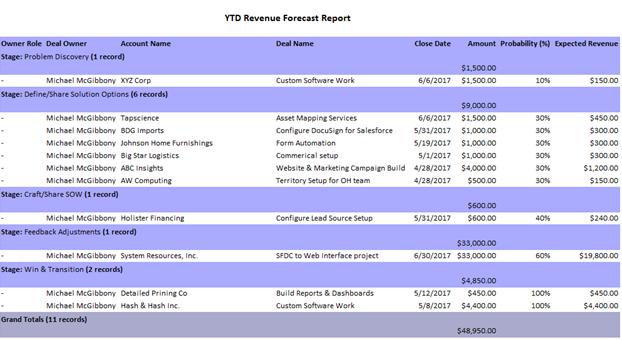
      The critical computation for the forecast is related to the Opportunity Amount, the Stage, and the Probability. Because management continuously reviews the percentage of deals that close based on information gathered that is related to a “good” deal and a “not-so-good” deal, the probability represents what the likelihood is that a deal will close with the details of each input about the deal. Here is an example of a typical forecast report:

      As you can see from the example, the Amount column represents the total expected revenue to be generated from the deals in the list while the Expected Revenue is related to which stage the deal is in and the probability associated with that stage based on historical outcomes. For example, the first deal in the report for XYZ Corp, shows a deal that is valued at $1,500 but because it is so early in its stage, the deal probability is only 10% based on experience. The basis of the 10% can be further adjusted if the parameters of this specific deal are not in line with what historical deals may have had too if they are vastly different from past deal parameters.

      Let’s dive into parameters now. These parameters are custom defined attributes of a deal based on sales leadership’s knowledge of their product and services. Each stage has a set of specific parameters that must be articulated to a prospective customer to learn whether they are a true buyer.

      Suppose we look at all the stages in another deal example. Looking at each stage below, we have a specific set of actions and information that must be captured by the rep from the prospect by stage to give credibility to the overall health a deal. Here is a table of what this might look like:

      Stage – Prospecting
      Parameters to learn in this stage:

      • Reception to Elevator Pitch – pitch the deal
      • Size of organization – how big is the org – are they the right “fit” for our product/service
      • Has a compelling driver for product/service – what is the pain point that they are experiencing
      • There is a project sponsor and budget – can they fund this project or get funding – what is the cost of doing nothing?

      Stage – Discovery
      Parameters to learn in this stage:

      • Define current problem – size up the problem and the effect on the organization’s operation – what is the metric
      • Where is the pain felt from the problem – which area of the organization is experiencing the problem
      • What other options are being considered for the solution – competitors

      Stage – Solution/Presentation
      Parameters to learn in this stage:

      • Share solution options and successes from them – present the solution and pricing
      • Implementation timeline presented and solution demonstrated – how will the solution get implemented and how long will it take
      • Feedback on demonstration – what is the reaction and next step from the prospect and the sponsors

      Stage – Negotiate and Close
      Parameters to complete in this stage:

      • Submit final adjustments and contract for signing – any discounts, other terms and conditions to consider pushing the deal through
      • Plan implementation – bring the players in for the implementation game plan
      • Get documents signed and hand-off to production – ink the deal!

      Each of these parameters for the stages in this example are key turning points (tipping points that take the deal to the next step/deal velocity) for the deal to progress and move forward. As each of these parameters are learned, completed, and evaluated for quality related to the history of similar opportunities, the probability is established based on the answers to each of the parameters. For example, if in stage Prospecting, it is learned that there is no funding for the deal, then the chances will be very low to zero that this deal will progress, so it would fall “outside” of the “normal” historical deal flow for this stage.

      We invite your feedback and ideas to share related to the revenue forecast. Please contact us with your comments and questions.